What it is
The unit of analysis is the radiologist's reporting workflow, not the model. AI capabilities should be composable and selectable: a practice chooses individual capabilities from a menu of modular services, much like ordering à la carte, and adapts them to local needs without waiting for an enterprise procurement cycle.
The motivating gap is a mismatch of timelines. Enterprise reporting environments move through multiyear contracts, vendor roadmaps, security review, and change management. AI capabilities advance far more quickly.
What it is not:
- Not a new model, algorithm, or architecture.
- Not a new reporting platform or workstation product.
- Not a procurement guide, vendor scorecard, or benchmark.
- Not anti-enterprise-AI. Complementary, not adversarial.
- Not a regulatory proposal.
- Not a generic AI-adoption taxonomy.
More on where it sits
The framework is vendor-neutral by default and complementary to enterprise integration. Where vendor-supported integration exists and meets clinical needs, it remains the preferred solution. Locally validated workflows can accelerate adoption while informing what enterprise systems should eventually support, and highly specialized or site-specific workflows may continue to use the modular architecture as their primary integration layer.
Capabilities that could reduce cognitive workload or improve efficiency can otherwise sit without a practical route into the workflows where they would be used.
How it works
Two established building blocks, and a loop that joins them.
Lightweight automation layer. Automation software operates the user interfaces clinical applications already expose, the way a human user would. No modification of the underlying systems.
API endpoint. An external service receives a request and returns a response. What matters is the interaction contract, not the model behind it, which can be substituted or upgraded after local validation.
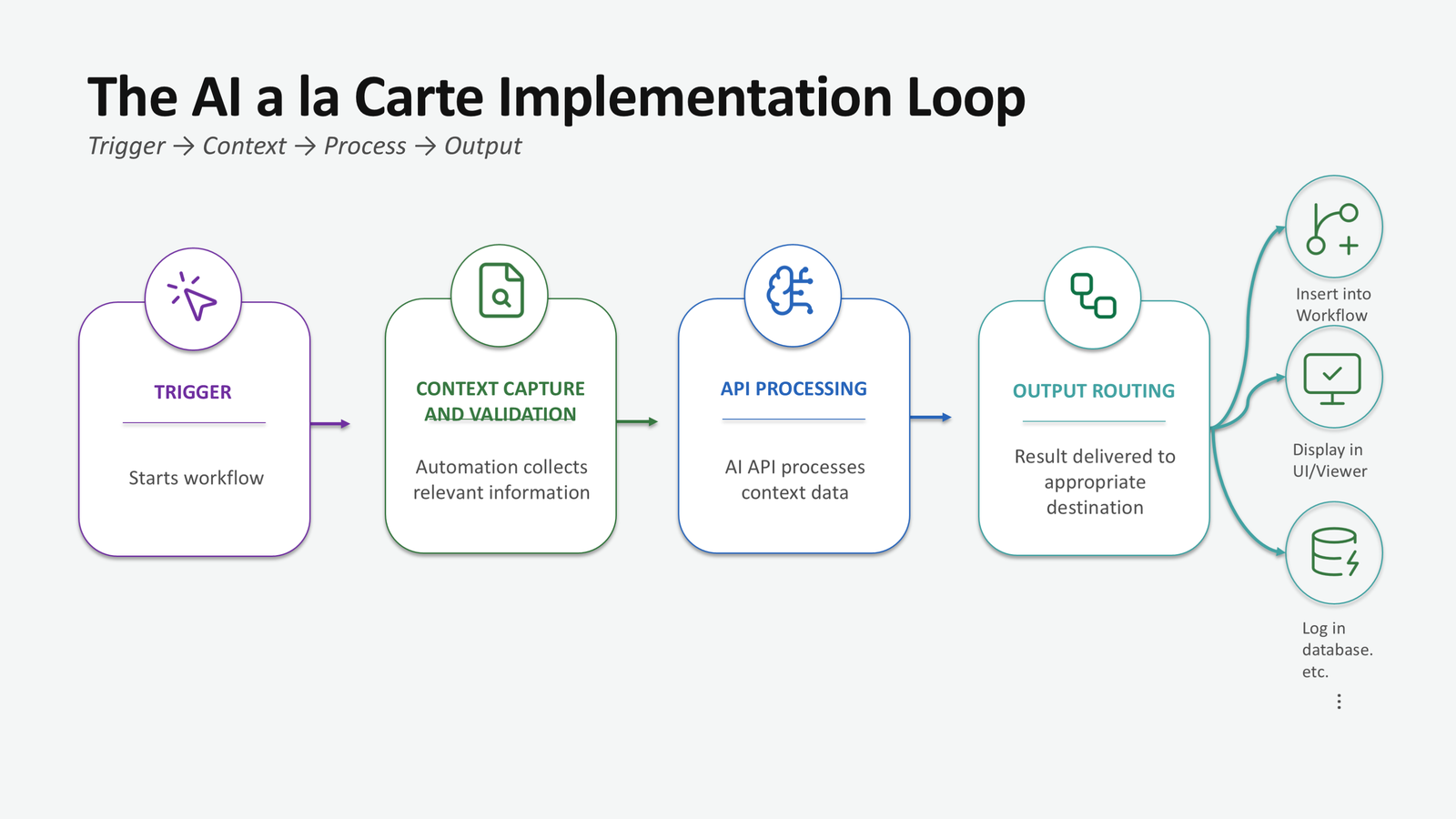
The loop. A trigger initiates the process, clinical context is captured and validated, an AI task is performed, and the output returns to the radiologist for review. Confirming the correct patient, study, and workflow state before anything is transmitted or written is what distinguishes a clinical implementation from an automation demonstration.
Read the full description
Virtually every clinical application already exposes a user interface, and automation software can operate those interfaces the way a human user would. This gives an application-agnostic interoperability layer that requires no modification of the underlying systems. In practice, the automation layer detects workflow triggers, identifies the active study and application, captures and validates the relevant clinical context, submits requests to AI endpoints, and routes outputs back into the reporting environment for radiologist review, with logging and safe fallback behavior throughout.
The API endpoint is the second building block, through which an external computational service receives a request and returns a response. More important than any particular model is the interaction contract the endpoint defines. Behind it may sit a large language model, a vision-language model, a rules-based system, or a future AI service. Provided appropriate local validation is performed, capabilities can be substituted or upgraded while the surrounding workflow stays the same.
Four implementation patterns
Configurations of a single architecture, differing along trigger, timing, and output routing. Their components recombine freely.
| Pattern | Trigger | AI task | Output routing | Also serves |
|---|---|---|---|---|
| User-initiated real-time completion | Voice command or hotkey | Text generation (e.g., draft impression) | Inserted in report, labeled, for review | History condensation; macro population; prior-report comparison |
| User-initiated real-time consultation | Voice command on highlighted finding | Reasoning/retrieval (e.g., differential diagnosis) | Separate consultation panel | Guideline criteria lookup; similar-case retrieval |
| Background monitoring | Report state (e.g., pre-sign) | Error detection | Alert or highlighted text | Laterality, missing-comparison, and completeness checks |
| Background preprocessing | Study arrival | Image-based draft generation (VLM) | Stored outside record; enters dictation only on acceptance | History summary at study open; pre-extracted measurements; protocol suggestion |
What transfers between practices is the pattern and its design choices, not any specific implementation.
Read the four patterns in full
User-initiated real-time completion The radiologist triggers the workflow by voice command or hotkey after dictating findings. The automation layer validates the clinical context, sends a minimal payload to an approved endpoint, and returns a draft that may appear at the cursor, in a preview window, or in a side panel. The principal considerations are validating context before transmission, minimizing the data sent, and clearly labeling generated text so that review remains active rather than reflexive. The radiologist reviews, edits, accepts, or rejects the draft and remains responsible for the signed report. A trigger that never fires leaves manual dictation untouched, and an unavailable endpoint returns the radiologist to the manual workflow behind a nonblocking status indication.
User-initiated real-time consultation A highlighted finding is sent for differential-diagnosis, guideline, or reference support, and the response returns to a separate consultation panel rather than the report. Routing results to a dedicated panel reduces the risk that suggestions are mistaken for verified report content while preserving the radiologist's independent clinical judgment.
Background monitoring The trigger is the state of the report itself, such as before signing, after dictation inactivity, or on section completion. The current report text is analyzed for internal inconsistencies, and concerns return as alerts rather than modifications. The design challenge is balancing sensitivity with interruption. A monitor must catch clinically meaningful errors without breeding alert fatigue, and its misses deserve as much attention as its alerts, because studies that pass silently can create false reassurance.
Background preprocessing Computation happens before the point of care. An eligible study's arrival triggers a background process that submits the examination to an approved vision-language endpoint. The resulting draft is stored outside the system of record, retrieved when the radiologist opens the study, and inserted only if explicitly accepted. Every stored draft must remain bound to the correct accession and be withheld if new images or amendments make it stale. Because a prepared draft can frame the read that follows, implementations should preserve independent image review. Because this workflow analyzes diagnostic images, its regulatory and validation profile differs from the text-based patterns.
One voice trigger can generate an impression, request a differential, or populate a macro. One summarization capability can serve a real-time workflow on demand or a preprocessing workflow prepared ahead. This separation between the clinical capability and the workflow deploying it is the sense in which the framework is à la carte.
Implementation considerations
- Map where clinical data transiently lives.
- Approve every endpoint that receives protected health information.
- Treat context integrity as equal to model accuracy.
- Validate the complete workflow, not only the model.
- Evaluate locally and monitor afterward.
- Assign ownership.
- Plan for interface change.
- Degrade safely.
- Assess regulatory posture by intended use.
Read each consideration in full
- Map where clinical data transiently lives. Clipboard contents, temporary files, screenshots, buffers, and orchestration logs all count. Establish what is collected, where it is stored, whether it leaves the institution, and who can access it.
- Approve every endpoint that receives protected health information through institutional security, privacy, compliance, and legal review.
- Treat context integrity as equal to model accuracy. A highly accurate model operating on the wrong patient, report, or stale screen state can still produce a serious error.
- Validate the complete workflow, not only the model. Context capture, request construction, output routing, and the radiologist's interaction with the result all affect clinical performance.
- Evaluate locally and monitor afterward. Model performance can degrade across institutions, so each capability should be evaluated on representative local cases before deployment and monitored after it, accounting for automation bias rather than treating acceptance of outputs as evidence of correctness.
- Assign ownership. Every deployed workflow should have an identifiable owner, a documented purpose, an approved endpoint, version control, and a rollback process.
- Plan for interface change. Interface-driven automation can fail when application layouts, software versions, or authentication processes change, so deployed workflows need monitoring and designated support.
- Degrade safely. An unavailable service should return the radiologist to the manual workflow rather than block clinical work.
- Assess regulatory posture by intended use. Image-analyzing workflows may have a different regulatory profile from text-based assistive tools. Review specific implementations with institutional counsel alongside vendor license and acceptable-use terms.
Governance checklist
Stage by stage, around the implementation loop. A starting point for local review, not a substitute for it.
Trigger
- The capability is approved for clinical use and has a documented purpose.
- Invocation is controlled: who can fire the workflow, and from which workflow state, is defined.
- A trigger that never fires leaves the manual workflow untouched.
Context and PHI
- Patient, study, and workflow state are confirmed before anything is transmitted or written.
- Every place clinical data transiently lives is mapped, including clipboard, temporary files, screenshots, buffers, and logs.
- What is collected, where it is stored, whether it leaves the institution, and who can access it are documented.
- The payload sent to the endpoint is the minimum the task needs.
Endpoint
- Any endpoint receiving protected health information has passed institutional security, privacy, compliance, and legal review.
- The endpoint is authorized, logged, and versioned. For a vendor endpoint, license and acceptable-use terms have been reviewed.
- The capability has been evaluated on representative local cases before deployment, and the complete workflow was validated, not only the model.
Output
- A radiologist reviews generated content before it enters the report or the record.
- Generated text is clearly labeled so that review remains active rather than reflexive.
- Outputs are audited after deployment, accounting for automation bias.
Lifecycle
- The workflow has a named owner and designated support.
- Version control and a rollback process exist.
- Monitoring covers interface changes (layouts, software versions, authentication) and model drift.
- An unavailable service returns the radiologist to the manual workflow rather than blocking clinical work.
- The regulatory profile has been assessed for how the workflow is actually used, with institutional counsel where images are analyzed.
- A re-review schedule is set.
Where this work has appeared
- SIIM 2026 Annual Meeting, June 9, 2026. Session: AI à la Carte: Using Automation to Bring Distributed AI to your Reporting Environment. Rated one of the top six sessions of the meeting.
- SIIM Enterprise Imaging Webinar Series, September 10, 2026. AI à la Carte: From Prototype to Production, Governing Composable Automation and AI Workflows. Speakers: Shawn Lyo, Karan Jani, Nicholas Said.